A Community discussion forum for Halo Custom Edition, Halo 2 Vista, Portal and Halo Machinima
|
 Home
Home Search
 Register
 Login
Login Member List
 Recent Posts
| »Forums Index »Halo Custom Edition (Bungie/Gearbox) »Halo CE General Discussion »questions 'bout hacked sapien (a_hobo) | 
|
| Author | Topic: questions 'bout hacked sapien (a_hobo) (6 messages, Page 1 of 1) | ||||
| Moderators: Dennis | |||||
 Aj Ninami Joined: Dec 15, 2009 
Helps old ladies in need |
Posted: Feb 19, 2010 12:33 AM
Msg. 1 of 6
1: how do i make the lightmap brush bigger?
2: how do i make the game view not maximized? |
||||


|
|||||
|
Dark Neon Joined: Jun 8, 2009 
|
Posted: Feb 19, 2010 02:00 AM
Msg. 2 of 6
Quote: --- Original message by: Aj Ninami 1: how do i make the lightmap brush bigger? 2: how do i make the game view not maximized? WUT. |
||||
|
|
|||||
|
Aj Ninami Joined: Dec 15, 2009
Helps old ladies in need |
Posted: Feb 19, 2010 02:26 AM
Msg. 3 of 6
Quote: --- Original message by: Aj Ninami This is my current setup: 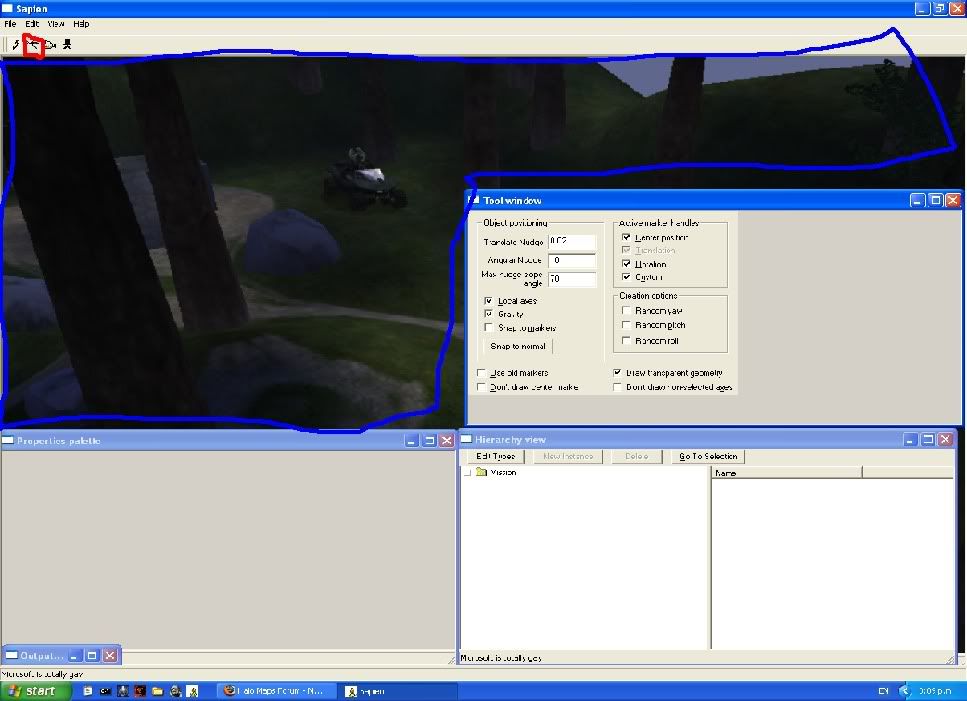 http://i974.photobucket.com/albums/ae229/4wk_n1nja/doodel.jpg what i want to know is: RED: This tool, witch i refer to as the lightmap tool, when i use it, it barely paints a surface. i wish to know if/how it is possible to enlarge the brush size. BLue: I wish to make this game view the same size as the other windows. How? fixed, sorry for confusion. |
||||
|
|
|||||
|
sleepy1212 Joined: Feb 4, 2009 
sunnier than you www.quantumfusionclan.com |
Posted: Feb 19, 2010 10:42 AM
Msg. 4 of 6
sapien feature fail
minimize all those windows, bring them back one by one while resizing. for the most part Properties, Heirarchy, and Game are the only windows you need minimize the others until you need them. |
||||
|
|
|||||
|
Aj Ninami Joined: Dec 15, 2009
Helps old ladies in need |
Posted: Feb 19, 2010 03:39 PM
Msg. 5 of 6
ok, but i need my game view smaller. possible?
|
||||
|
|
|||||
|
sleepy1212 Joined: Feb 4, 2009
sunnier than you www.quantumfusionclan.com |
Posted: Feb 19, 2010 03:47 PM
Msg. 6 of 6
Quote: --- Original message by: Aj Ninami ok, but i need my game view smaller. possible? restore down the main window, that should bring back the Game window |
||||
|
|
|||||

|
