A Community discussion forum for Halo Custom Edition, Halo 2 Vista, Portal and Halo Machinima
|
 Home
Home Search
 Register
 Login
Login Member List
 Recent Posts
| »Forums Index »Halo Custom Edition (Bungie/Gearbox) »Halo CE Technical / Map Design »Mixing to Bitmaps in a Shader | 
|
| Author | Topic: Mixing to Bitmaps in a Shader (6 messages, Page 1 of 1) | ||||
| Moderators: Dennis | |||||
 YakZSmelk Joined: Apr 3, 2006 
- Environment Artist - robhow.com |
Posted: Jan 18, 2010 06:00 PM
Msg. 1 of 6
I'm having a bit of trouble creating a ground texture for the map I'm working on, in the map it's a forest so there is leaves all over the ground but dirt paths were players could follow. I have the tileable dirt and leaf textures I'm working with and have put the alpha (for where the dirt should appear) in the dirt bitmap file.
What I cannot figure out how to do is make it so the dirt appears where it should, I looked at a shader tutorial that was no help what so ever. Wow I know that probably isn't making any sense but If anyone catches my drift and can help me figure out how to do this it would be much appreciated. |
||||


|
|||||
|
YakZSmelk Joined: Apr 3, 2006
- Environment Artist - robhow.com |
Posted: Jan 18, 2010 07:39 PM
Msg. 2 of 6
I dunno haha
Right now I'm mixing the primary and secondary detail maps, but it's multiplying the two. What I want is just to have the dirt to appear where the alpha tells it too but still be able to be tiled in that area. And underneath the dirt I want to have the leaf tileable texture. |
||||
|
|
|||||
|
YakZSmelk Joined: Apr 3, 2006
- Environment Artist - robhow.com |
Posted: Jan 18, 2010 08:15 PM
Msg. 3 of 6
I think that's what I'm looking for could you show a brighter image?
So would I put the leaves bitmap as the base texture and then put the dirt in the primary with an alpha? |
||||
|
|
|||||
|
YakZSmelk Joined: Apr 3, 2006
- Environment Artist - robhow.com |
Posted: Jan 18, 2010 08:41 PM
Msg. 4 of 6
It looks like the dirt is blending with the grass in the grasses 'area'
If that isn't happening sorry, it's still a dark image. What I want is just to have the alpha say; white = dirt black = leaves I want the alpha to work as a mask, I don't want them to blend unless there is gray in the alpha. Are you familiar with composite materials in max? BTW I realize this thread may be giving you a headache, so sorry but I really appreciate you helping me out. Edited by YakZSmelk on Jan 18, 2010 at 08:42 PM |
||||
|
|
|||||
|
YakZSmelk Joined: Apr 3, 2006
- Environment Artist - robhow.com |
Posted: Jan 19, 2010 03:28 AM
Msg. 5 of 6
Ok I got it working, I was having a hard time understand when not sitting at the computer. I had it setup right just needed to change the base image it was creating some really weird colors due to the multiply.
Here's what it looks like at the moment; 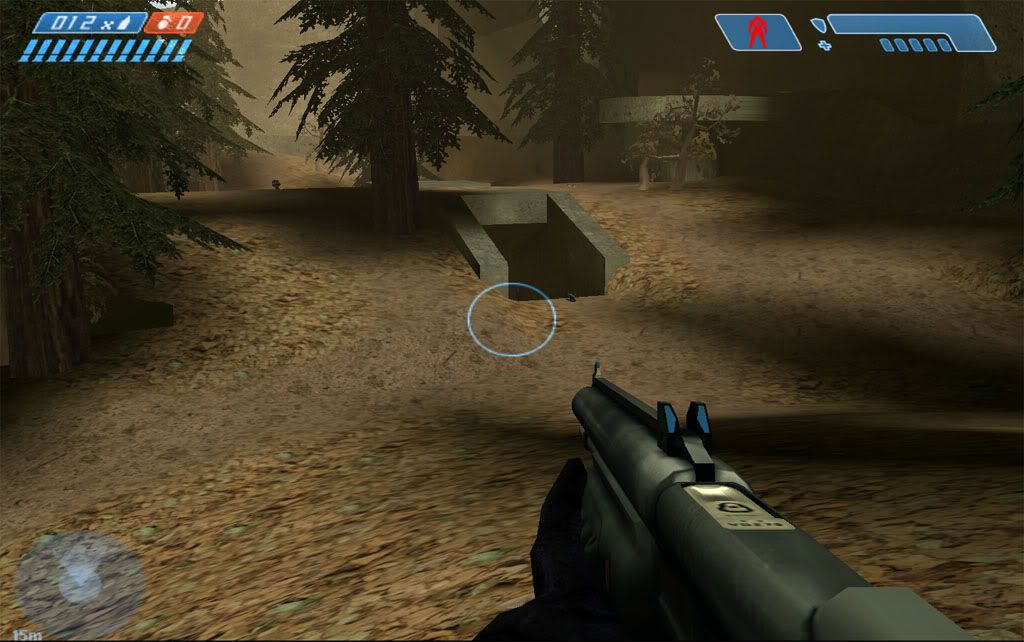 |
||||
|
|
|||||
|
sleepy1212 Joined: Feb 4, 2009 
sunnier than you www.quantumfusionclan.com |
Posted: Jan 19, 2010 10:58 AM
Msg. 6 of 6
are the leaves part of the bitmap or a detail?
|
||||
|
|
|||||

|
