A Community discussion forum for Halo Custom Edition, Halo 2 Vista, Portal and Halo Machinima
|
 Home
Home Search
 Register
 Login
Login Member List
 Recent Posts
| »Forums Index »Halo Custom Edition (Bungie/Gearbox) »Halo CE Technical / Map Design »detail maps | 
|
| Author | Topic: detail maps (5 messages, Page 1 of 1) | ||||
| Moderators: Dennis | |||||
 sleepy1212 Joined: Feb 4, 2009 
sunnier than you www.quantumfusionclan.com |
Posted: Aug 13, 2009 09:37 PM
Msg. 1 of 5
how do i align them with textures i tiled in max?
|
||||


|
|||||
|
chrisk123999 Joined: Aug 10, 2008 
=CE= Chris [Captain] [=] |
Posted: Aug 13, 2009 11:40 PM
Msg. 2 of 5
Detail maps are used in shaders and aren't used in Max.
|
||||
|
|
|||||
|
sleepy1212 Joined: Feb 4, 2009
sunnier than you www.quantumfusionclan.com |
Posted: Aug 14, 2009 10:45 AM
Msg. 3 of 5
hrm...no no no. The shader is what im talking about.
I tiled the texture in max but the primary detail map in the shader doesn't line up with the tiled texture. If the texture is a single tile (1), should the primary map scale (in the shader) also be 1, or does it correlate in any way to the UV tiling in the material editor? here's an example: 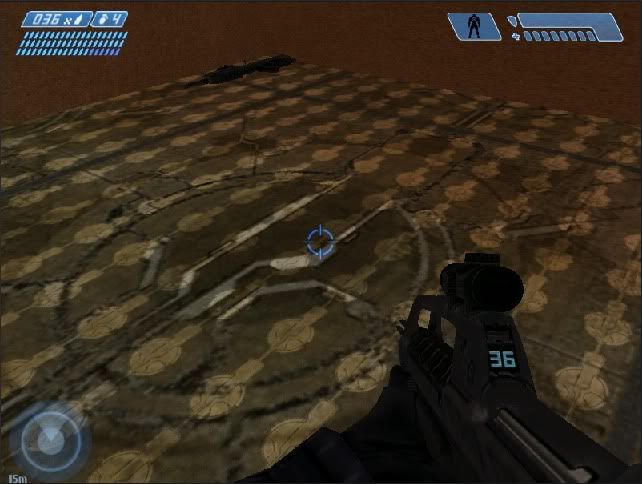 you can see the much smaller detail map not aligned with the texture. |
||||
|
|
|||||
|
chrisk123999 Joined: Aug 10, 2008
=CE= Chris [Captain] [=] |
Posted: Aug 14, 2009 01:05 PM
Msg. 4 of 5
Check if it's rescaling it.
|
||||
|
|
|||||
|
sleepy1212 Joined: Feb 4, 2009
sunnier than you www.quantumfusionclan.com |
Posted: Aug 14, 2009 02:35 PM
Msg. 5 of 5
I didn't see any settings that would rescale but the UV map and the Material tiling don't match up. It looks fine until i add a UV map, which ends up being only about half as tiled as it's supposed to.
I changed the primary detail map scale to 1 and it looks like it's about the right size for the texture but it still doesn't line up. EDIT: after tiling correctly (below) i end up with a texture:detail of about 4:1. I'll try scaling the detail to 4 instead of 1 and see if that does the trick. I know I'm not tiling right in the first place because it doesn't look right in-game. there's a major difference between what i did in the material editor and what actually comes out. When i use the tiling options in UVW it does the same thing. EDIT: tile using Unwrap>Edit>Scale...doh! Edited by sleepy1212 on Aug 14, 2009 at 03:50 PM |
||||
|
|
|||||

|
