A Community discussion forum for Halo Custom Edition, Halo 2 Vista, Portal and Halo Machinima
|
 Home
Home Search
 Register
 Login
Login Member List
 Recent Posts
| »Forums Index »Halo Custom Edition (Bungie/Gearbox) »Halo CE General Discussion »Marine_armored_mp.biped | 
|
| Author | Topic: Marine_armored_mp.biped (29 messages, Page 1 of 1) | ||||
| Moderators: Dennis | |||||
 ptowery Joined: Aug 28, 2007 
oify |
Posted: Aug 4, 2008 01:44 PM
Msg. 1 of 29
okay, im making a marine that has red/blue stripes on its armor depending on its team... i already photoshopped the bitmaps for legs, arms, torso, and helmet making white stripes on them. how do i tag them into my new bipeds...?
|
||||


|
|||||
|
_TheArbiter_ Joined: Apr 22, 2007 
"stupidity is an epidemic " - Donut |
Posted: Aug 4, 2008 01:46 PM
Msg. 2 of 29
Quote: --- Original message by: ptowery okay, im making a marine that has red/blue stripes on its armor depending on its team... i already photoshopped the bitmaps for legs, arms, torso, and helmet making white stripes on them. how do i tag them into my new bipeds...? convert those TIFF files into bitmaps, then go into the shaders the marine has and replace the old bitmaps with the new ones you made |
||||
|
|
|||||
|
ptowery Joined: Aug 28, 2007
oify |
Posted: Aug 4, 2008 01:52 PM
Msg. 3 of 29
yeah, but i want to keep the old marine so i copied and renamed and refoldered the biped, can i change the directory in sapien by opening the new biped? and also, shaders? wouldnt it be in bitmaps?
Edited by ptowery on Aug 4, 2008 at 01:56 PM |
||||
|
|
|||||
|
_TheArbiter_ Joined: Apr 22, 2007
"stupidity is an epidemic " - Donut |
Posted: Aug 4, 2008 02:00 PM
Msg. 4 of 29
Quote: --- Original message by: ptowery yeah, but i want to keep the old marine so i copied and renamed and refoldered the biped, can i change the directory in sapien by opening the new biped? and also, shaders? wouldnt it be in bitmaps? Edited by ptowery on Aug 4, 2008 at 01:56 PM to tell the game wich bitmap it will use for the model you must open the shaders of the marine....and yes you can change that in sapien...just find the new folder, open it and place it around if you want, but for making it a playable character you must change it in the globals |
||||
|
|
|||||
|
ptowery Joined: Aug 28, 2007
oify |
Posted: Aug 4, 2008 02:22 PM
Msg. 5 of 29
lol, did i really say sapien? ^^ i ment gurella.. ok, ill see it this works
also, did i have to edit the multipurpose bitmaps? Edited by ptowery on Aug 4, 2008 at 02:26 PM |
||||
|
|
|||||
|
_TheArbiter_ Joined: Apr 22, 2007
"stupidity is an epidemic " - Donut |
Posted: Aug 4, 2008 03:01 PM
Msg. 6 of 29
Quote: --- Original message by: ptowery lol, did i really say sapien? ^^ i ment gurella.. ok, ill see it this works also, did i have to edit the multipurpose bitmaps? Edited by ptowery on Aug 4, 2008 at 02:26 PM about multis: yes, you would need to change the color channels in photoshop so the part that will show the team is in blue check the mp_cyborg multi´s so you cn see what i mean |
||||
|
|
|||||
|
ptowery Joined: Aug 28, 2007
oify |
Posted: Aug 4, 2008 04:43 PM
Msg. 7 of 29
like this?
  both were edited by Ptowery |
||||
|
|
|||||
|
_TheArbiter_ Joined: Apr 22, 2007
"stupidity is an epidemic " - Donut |
Posted: Aug 4, 2008 05:52 PM
Msg. 8 of 29
Quote: --- Original message by: ptowery like this? both were edited by Ptowery yes just like that |
||||
|
|
|||||
|
Donut Joined: Sep 30, 2006 
I swear I'm not actually dead |
Posted: Aug 4, 2008 10:59 PM
Msg. 9 of 29
uh, no. color change is alpha channel, not blue. bad arby
|
||||
|
|
|||||
|
_TheArbiter_ Joined: Apr 22, 2007
"stupidity is an epidemic " - Donut |
Posted: Aug 4, 2008 11:18 PM
Msg. 10 of 29
Quote: --- Original message by: Donut uh, no. color change is alpha channel, not blue. bad arby alpha channel is for transparency.......blue channel is for ...blue.... he would just need to paint with white (on the blue channel) what he wants to change color |
||||
|
|
|||||
|
Donut Joined: Sep 30, 2006
I swear I'm not actually dead |
Posted: Aug 4, 2008 11:24 PM
Msg. 11 of 29
you need to not contradict me. why would you use alpha on a multipurpose map? alpha on multipurpose maps is how you change color. think im wrong? go look at the multipurpose maps on something that changed color
|
||||
|
|
|||||
|
_TheArbiter_ Joined: Apr 22, 2007
"stupidity is an epidemic " - Donut |
Posted: Aug 4, 2008 11:32 PM
Msg. 12 of 29
Quote: --- Original message by: Donut you need to not contradict me. why would you use alpha on a multipurpose map? alpha on multipurpose maps is how you change color. think im wrong? go look at the multipurpose maps on something that changed color alphas are to tell what is visible and what is not open a multi bitmap as you can see "dont show alpha" makes you able to see what are the colors it has to make something blue:change color red: reflections green: lights or things like that etc if you click on "show alphas" you will see on white what is visible (or what the multi should act on) and black wich is the non-visible (or on what the multi shouldnt act on) |
||||
|
|
|||||
|
Donut Joined: Sep 30, 2006
I swear I'm not actually dead |
Posted: Aug 4, 2008 11:34 PM
Msg. 13 of 29
open the elite multipurpose map. look at the alpha. thats the color change. stop talking.
|
||||
|
|
|||||
|
_TheArbiter_ Joined: Apr 22, 2007
"stupidity is an epidemic " - Donut |
Posted: Aug 4, 2008 11:40 PM
Msg. 14 of 29
Quote: --- Original message by: ptowery both were edited by Ptowery as you can see, in here, the black is what the multi shouldnt act on still what i understand for alphas and alpha channel is things like this: http://i25.photobucket.com/albums/c86/Fishypants/ps-tutorial_image-02.jpg |
||||
|
|
|||||
|
_TheArbiter_ Joined: Apr 22, 2007
"stupidity is an epidemic " - Donut |
Posted: Aug 4, 2008 11:54 PM
Msg. 15 of 29
Quote: --- Original message by: sKc_chains Stop fighting! Yall used to be best friends! who said we were fighting :) |
||||
|
|
|||||
|
Donut Joined: Sep 30, 2006
I swear I'm not actually dead |
Posted: Aug 5, 2008 12:01 AM
Msg. 16 of 29
.... what... black? you are looking at the marine bitmap. marines do not have color change. since you dont listen, im going to show you what i mean
these are the arm bitmaps of the elite  white area change color. thats why they are white  green is self illumination. blue is reflection  this is the alpha channel for color change  this is a pic of some color changed elites look at how the alpha matches up to the base map. alpha is obviously color change. blue is used for reflection. the reason that the marines are purple are becuase red has something to do with lighting, and since red + blue = purple, do the math. do not contradict me. edit: we are not fighting. this is called a debate, because its educational. we are still good friends, im just backing up / proving my point Edited by Donut on Aug 5, 2008 at 12:03 AM |
||||
|
|
|||||
|
Nugga117 Joined: Nov 14, 2005 
|
Posted: Aug 5, 2008 12:20 AM
Msg. 17 of 29
My own research:
The blue area denotes that the area needs to change colors, and that the area will use a cubemap (reflection). The alpha channel can section off areas that change colors, if there are areas on the bitmap that would not look good with the color change. See the cyborg multipurpose map to see what I mean. On the bitmap, almost the whole thing is some shade of blue. However, we all know that the whole biped doesn't change color. That's where the alpha channel comes in, to make certain areas (like the black undersuit) maintain the look that is defined in the normal bitmap. |
||||
|
|
|||||
|
Donut Joined: Sep 30, 2006
I swear I'm not actually dead |
Posted: Aug 5, 2008 12:24 AM
Msg. 18 of 29
go ask dano. im pretty sure blue and alpha dont do the same thing. the whole thing is blue because it controls reflection, not color change. if alpha sectioned it off, why would the illumination still work? your research is somewhat flawed. go ask on modacity so we can all be sure if you want to challenge my research.
|
||||
|
|
|||||
|
Nugga117 Joined: Nov 14, 2005
|
Posted: Aug 5, 2008 12:32 AM
Msg. 19 of 29
Blue (and apparently purple) is color change.
Do this: Change the cyborg armor's multipurpose map to the warthog multimap. Go look at the change. Edited by Nugga117 on Aug 5, 2008 at 12:39 AM |
||||
|
|
|||||
|
ptowery Joined: Aug 28, 2007
oify |
Posted: Aug 5, 2008 12:33 AM
Msg. 20 of 29
okay, I'm in the tagging stage.. I've changed all the shaders and saved them as (shader)_mp.shader (extension may be different) and I'm changing the biped to all kinds of things similar to cyborg_mp.biped and i need to know:
how do i apply the shaders to the biped, how do i apply the marine fp arms i downloaded what shouldn't i change in gurella for the biped? do i need to change a specific thing to be able to have the blue parts be team colors will the blue parts also apply to choosing your color in normal slayer? ABOUT THIS NONSENSE also, when i looked at the origional marine multipuropse for the marine, it was all black and purplish red. no blue at all. and i looked at the cyborg_multipurpose and it was all blueish and had some green. i really dont know what to say to this debate untill my marines tested... THX, PTOWERY ^^ Edited by ptowery on Aug 5, 2008 at 12:40 AM |
||||
|
|
|||||
|
Me KS Joined: Feb 2, 2008 
Desire is Reality. Xfire: jetmaster23 |
Posted: Aug 5, 2008 12:38 AM
Msg. 21 of 29
I'm not taking sides in this argument, but this is straight from the shader_model tag in Guerilla:
 Pretty convincing that blue is the primary change color mask...but, maybe it's wrong, or not specific enough. |
||||
|
|
|||||
|
ptowery Joined: Aug 28, 2007
oify |
Posted: Aug 5, 2008 12:50 AM
Msg. 22 of 29
Quote: --- Original message by: Nugga117 Blue (and apparently purple) is color change. Do this: Change the cyborg armor's multipurpose map to the warthog multimap. Go look at the change. Edited by Nugga117 on Aug 5, 2008 at 12:39 AM WHAT? im just re-skinning the marines and changing them so they fit being playable... |
||||
|
|
|||||
|
Nugga117 Joined: Nov 14, 2005
|
Posted: Aug 5, 2008 12:53 AM
Msg. 23 of 29
Quote: --- Original message by: ptowery Quote: --- Original message by: Nugga117 Blue (and apparently purple) is color change. Do this: Change the cyborg armor's multipurpose map to the warthog multimap. Go look at the change. Edited by Nugga117 on Aug 5, 2008 at 12:39 AM WHAT? im just re-skinning the marines and changing them so they fit being playable... I was talking to donut. |
||||
|
|
|||||
|
ptowery Joined: Aug 28, 2007
oify |
Posted: Aug 5, 2008 12:55 AM
Msg. 24 of 29
Quote: --- Original message by: ptowery okay, I'm in the tagging stage.. I've changed all the shaders and saved them as (shader)_mp.shader (extension may be different) and I'm changing the biped to all kinds of things similar to cyborg_mp.biped and i need to know: how do i apply the shaders to the biped, how do i apply the marine fp arms i downloaded what shouldn't i change in gurella for the biped? do i need to change a specific thing to be able to have the blue parts be team colors will the blue parts also apply to choosing your color in normal slayer? ABOUT THIS NONSENSE also, when i looked at the original marine multipurpose for the marine, it was all black and purplish red. no blue at all. and i looked at the cyborg_multipurpose and it was all blueish and had some green. i really don't know what to say to this debate until my marines tested... THX, PTOWERY ^^ Edited by ptowery on Aug 5, 2008 at 12:40 AM can i has answer? |
||||
|
|
|||||
|
Donut Joined: Sep 30, 2006
I swear I'm not actually dead |
Posted: Aug 5, 2008 01:02 AM
Msg. 25 of 29
k nugga did what you said
here are the results: NORMAL MULTIPURPOSE MAP ON TORSO 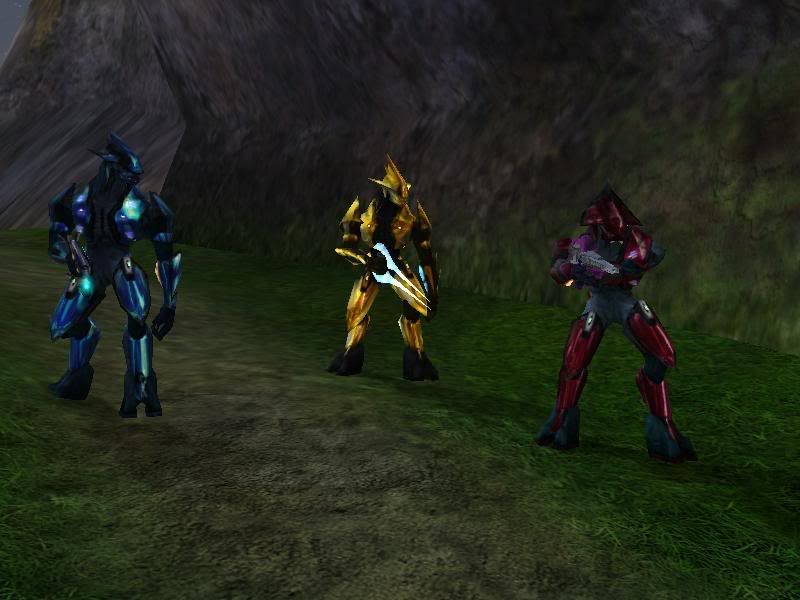 WARTHOG MULTIPURPOSE MAP ON TORSO 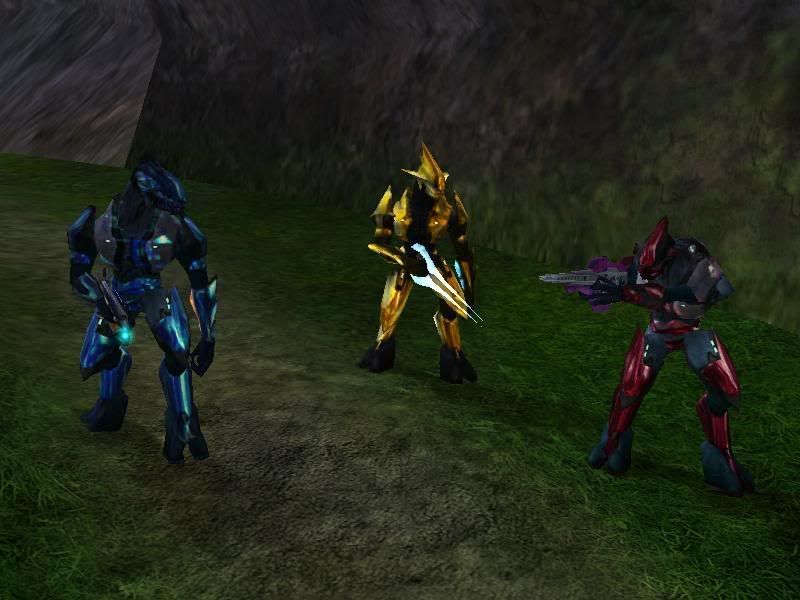 warthog multipurpose with alpha overlaid. areas underneath white are still purple like the rest of the texture  image one shows normal multipurpose maps, with normal alpha. image two shows the elite with the warthog multipurpose. the parts that are not color changed are the areas where the alpha (white in warthog multipurpose picture shown). the parts where there are alpha are both reflective and color changed, which supports some of what you are saying. that image meks posted is the description in a shader tag. the tag says blue is color change and that red is reflection. why then does the elite multipurpose only have blue, and still reflect? white alpha is necessary for color change. apparently blue is too, which completely contradicts all my experience with shader tags and the description in the tag. so, we are both partially wrong and partially right. alpha basically controls everything which makes no sense when blue is color change (detail maps maybe? i dont know), and blue is for colors and reflections. im not even sure what i just typed, im so tired.... maybe i missed something but you win for now. dont cross the hud line lol SO After this unbelievably time consuming debate, i just dont know any more. based on the elite i would say, blue for color and reflection, alpha channel where you want reflection but not color change, green if you want something to glow, i dont know what red does. edit 2: here is some good advice, dont leave a laptop on a leather couch. my laptop is so hot, the plastic is bending. this is not good. after reading this over, im realizing how damn inconsistent all of the shaders and bitmaps are. its almost impossible to tell how things actually work Edited by Donut on Aug 5, 2008 at 01:17 AM |
||||
|
|
|||||
|
ptowery Joined: Aug 28, 2007
oify |
Posted: Aug 5, 2008 01:35 AM
Msg. 26 of 29
guys, okay its blue... all i want to know is what i listed above donut's post.
pleas guys, i need to know this stuff. |
||||
|
|
|||||
|
Donut Joined: Sep 30, 2006
I swear I'm not actually dead |
Posted: Aug 5, 2008 01:37 AM
Msg. 27 of 29
we went a little over the top with the whole bitmap thing (omfg i need sleep)
the fp arms are done in globals |
||||
|
|
|||||
|
ptowery Joined: Aug 28, 2007
oify |
Posted: Aug 5, 2008 01:39 AM
Msg. 28 of 29
good night, err whatever,
well thats one thing off the list ^^ |
||||
|
|
|||||
|
Donut Joined: Sep 30, 2006
I swear I'm not actually dead |
Posted: Aug 5, 2008 05:28 PM
Msg. 29 of 29
shaders are applied in the gbxmodel of the biped. down at the bottom
|
||||
|
|
|||||

|
