A Community discussion forum for Halo Custom Edition, Halo 2 Vista, Portal and Halo Machinima
|
 Home
Home Search
 Register
 Login
Login Member List
 Recent Posts
| »Forums Index »Halo Custom Edition (Bungie/Gearbox) »Halo CE Technical / Map Design »Halo is like a box of chocolates. I NEVER know what to expect! | 
|
| Author | Topic: Halo is like a box of chocolates. I NEVER know what to expect! (4 messages, Page 1 of 1) | ||||
| Moderators: Dennis | |||||
 Mythic128 Joined: Jan 1, 2008 
-Account Locked- |
Posted: Jun 29, 2008 10:29 AM
Msg. 1 of 4
Halo has been not working for a couple months now. Every time I would quit a LAN game in it or join a network game, my whole computer would freeze (It's a laptop, if thats a source of problems). However,just recently, every time I tried to open up Halo: Custom Edition, I got this.
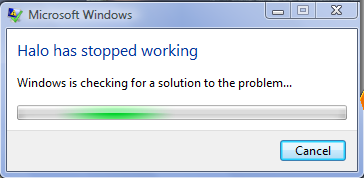 Yesterday, I tried to open it out of curiosity and kept getting this message. About the 4th time I tried to open it, guess what. It worked! I played a few matches on snow grove, having fun. I quit halo to get some of the new maps, when I got the "Halo has stopped working" message. I tried clicking on it multiple times like before, but no luck. I tried running it as administrator and it worked. But it went back to the oldest problem where my computer freezes when I try to do anything with the game. Any help? |
||||


|
|||||
|
BlueBlaze55 Joined: Aug 2, 2007 
burn burn... |
Posted: Jun 29, 2008 11:52 AM
Msg. 2 of 4
try uninstalling then reinstalling the game, just backup and any needed files
|
||||
|
|
|||||
|
Mythic128 Joined: Jan 1, 2008
-Account Locked- |
Posted: Jun 29, 2008 07:43 PM
Msg. 3 of 4
I found out the problem to the "halo has stopped working" message. But now I still have that problem where it freezes whenever I try to quit or start a new game in a map.
|
||||
|
|
|||||
|
MechWarrior001 Joined: Mar 13, 2007 
|
Posted: Jun 29, 2008 09:45 PM
Msg. 4 of 4
Try running it in Compatibility mode for XP.
Right click the Halo CE shortcut on your desktop and go to the compatibility tab. Also, since your Vista, make sure you also check the "Disable Desktop Composition" and "Disable Themes" check boxes. I don't know if I got the last one right, I'm using Linux :D |
||||
|
|
|||||

|
