A Community discussion forum for Halo Custom Edition, Halo 2 Vista, Portal and Halo Machinima
|
 Home
Home Search
 Register
 Login
Login Member List
 Recent Posts
| »Forums Index »Halo Custom Edition (Bungie/Gearbox) »Halo CE Technical / Map Design »Halo Launcher Utility problem | 
|
| Author | Topic: Halo Launcher Utility problem (6 messages, Page 1 of 1) | ||||
| Moderators: Dennis | |||||
 forrestkeller1 Joined: Nov 3, 2007 
What? Why am I still here? |
Posted: May 3, 2008 12:20 AM
Msg. 1 of 6
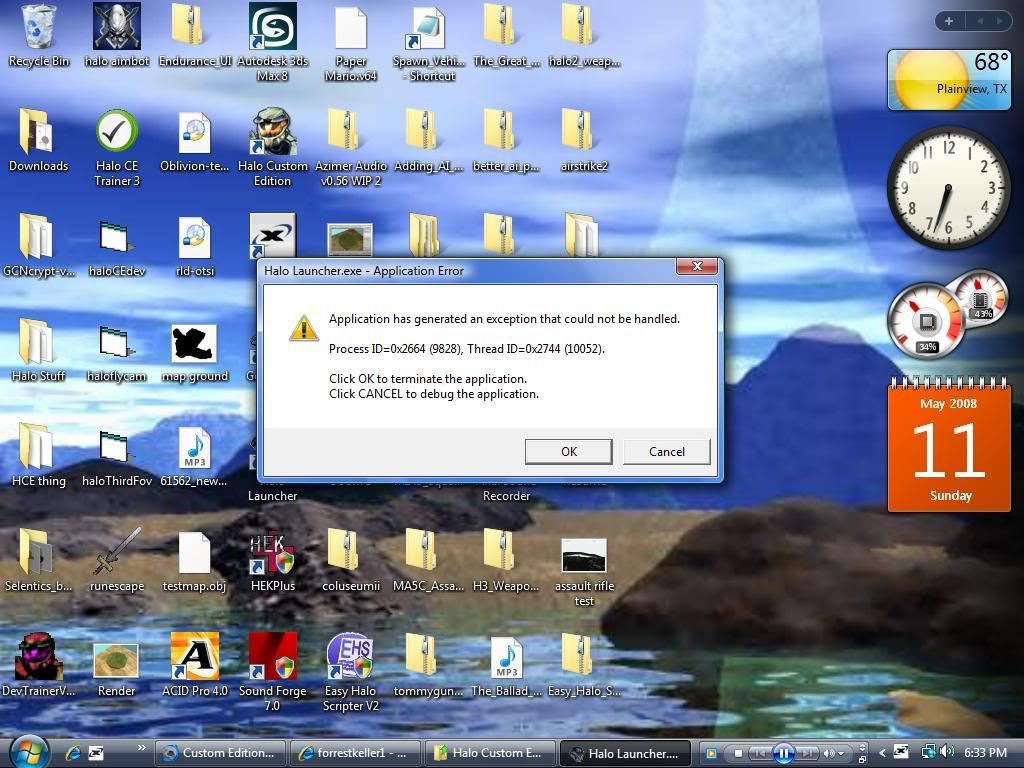
i went and download the halo launcher utility here: http://hce.halomaps.org/index.cfm?fid=3524 and i click the Halo Launcher.exe and it stops working i'v tryed everything and nothing works
Edit: sorry for the second post i accidently hit the post button twice. Edited by forrestkeller1 on May 3, 2008 at 12:21 AM |
||||


|
|||||
|
Rm860 Joined: Sep 7, 2006 
Dennis sleeps like this! |
Posted: May 3, 2008 01:42 AM
Msg. 2 of 6
Extract the application to your Halo Custom Edition root directory. The compiler interface will only work from there. To use the run tools, Kornman00's V2 of Guerilla must be present as well as ahobo.
Are you opening it up from the root directory or a shortcut from the root? dont worry about the double post, we can tell you didn't mean to. |
||||
|
|
|||||
|
forrestkeller1 Joined: Nov 3, 2007
What? Why am I still here? |
Posted: May 3, 2008 02:58 AM
Msg. 3 of 6
Yes i got it in the root folder and im trying to run it from shortcut from the root
|
||||
|
|
|||||
|
Somone77 Joined: Aug 25, 2007 
|
Posted: May 4, 2008 09:10 PM
Msg. 4 of 6
though what if i perfur using regular spaien. Could i just rename the .exe so its ahobo and then shouldnt it run it just like normal?
|
||||
|
|
|||||
|
Somone77 Joined: Aug 25, 2007
|
Posted: May 7, 2008 05:59 PM
Msg. 5 of 6
Quote: --- Original message by: cokeking i think you need to put your regular halo ce ui interface back in, i'd rather not touch anything with the ui nd stuff because it might screw up you halo CE wtf? that has nothing to do with this topic... |
||||
|
|
|||||
|
forrestkeller1 Joined: Nov 3, 2007
What? Why am I still here? |
Posted: May 11, 2008 07:35 PM
Msg. 6 of 6
here a pic of the error
 Edited by forrestkeller1 on May 11, 2008 at 07:36 PM |
||||
|
|
|||||

|
