A Community discussion forum for Halo Custom Edition, Halo 2 Vista, Portal and Halo Machinima
|
 Home
Home Search
 Register
 Login
Login Member List
 Recent Posts
| »Forums Index »Halo 2 Vista Forum (Bungie/Microsoft) »Halo 2 Vista General Discussion »Halo 2 Install Help | 
|
| Author | Topic: Halo 2 Install Help (13 messages, Page 1 of 1) | ||||
| Moderators: Dennis | |||||
 CRXxSkillzxXRC Joined: Jul 1, 2012 
Seriously, why look at MY quote of all people? |
Posted: Jul 15, 2012 06:45 AM
Msg. 1 of 13
Yesterday my girl broke my laptop, today I got a new one. I installed Halo and Halo CE fine. Halo 2 won't install though. It comes up with the install options and when I've set where I want it to be installed it disappears (as usual) and doesn't come back up. It used to work fine on my other laptop and I've even tried running the setup fix my brother gave me. Is it something I'm doing wrong or is the computer just being ridiculous?
Computer Specs:  Edited by CRXxSkillzxXRC on Jul 15, 2012 at 06:46 AM |
||||


|
|||||
|
Dumb AI Joined: Sep 18, 2011 
Dead. |
Posted: Jul 16, 2012 12:57 AM
Msg. 2 of 13
Do you think that 64-bits might be the problem?
|
||||
|
|
|||||
|
Kills_Alone Joined: Jun 17, 2009 
I ain't got no candy for you, NO CANDY |
Posted: Jul 16, 2012 01:58 AM
Msg. 3 of 13
64-Bit Windows is not he issue. Unless the problem is driver related, which is less likely on a new PC.
More likely the installer is not being executed by an Administrator account. |
||||
|
|
|||||
|
CRXxSkillzxXRC Joined: Jul 1, 2012
Seriously, why look at MY quote of all people? |
Posted: Jul 19, 2012 04:50 PM
Msg. 4 of 13
Well every time I put it in the install started up as usual so I assumed that it was already being executed by an admin account but I navigated to the install and clicked Run as administrator and something completly different popped up:
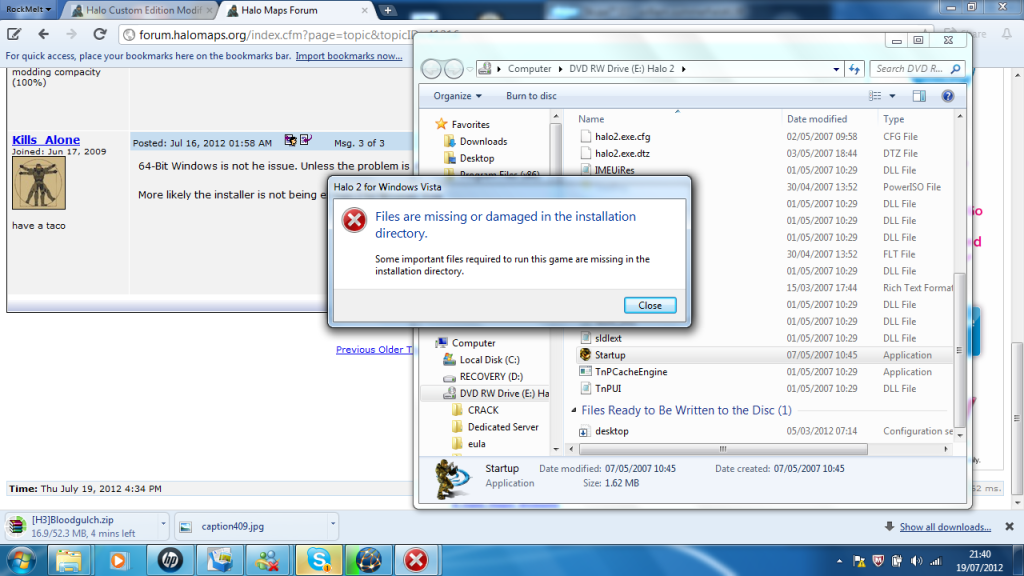 I got my old computer off of my brother and tried it and it worked fine :\ Edited by CRXxSkillzxXRC on Jul 19, 2012 at 04:50 PM |
||||
|
|
|||||
|
Kills_Alone Joined: Jun 17, 2009
I ain't got no candy for you, NO CANDY |
Posted: Jul 20, 2012 07:52 PM
Msg. 5 of 13
Darn, I don't know why it would say that. You could try copying all of the files from the disk to a temporary area on your hard drive then try to install as admin. You could also try downloading the ISO for the game and see if that installs with your legal key.
|
||||
|
|
|||||
|
CRXxSkillzxXRC Joined: Jul 1, 2012
Seriously, why look at MY quote of all people? |
Posted: Jul 24, 2012 08:16 PM
Msg. 6 of 13
I tried the first solution and it didn't work. I'm going to try the second and see if it works, although I'm feeling a bit dodgy about it :/
I hope it works because me and my friends played online frequently together before this happened and I think it would be a shame to see all the good times go... |
||||
|
|
|||||
|
flameomega Joined: Jul 19, 2010 
My animation portfolio http://farzad.csprance.com/ |
Posted: Jul 25, 2012 10:51 PM
Msg. 7 of 13
Quote: --- Original message by: CRXxSkillzxXRC I tried the first solution and it didn't work. I'm going to try the second and see if it works, although I'm feeling a bit dodgy about it :/ I hope it works because me and my friends played online frequently together before this happened and I think it would be a shame to see all the good times go... Its not dodgy at all, http://www.youtube.com/watch?v=m7aPkhn5em4 , my H2 PC Key ran out after a bunch of reinstalls so it wouldnt install anymore, I did this and online works fine. Hope yours works out fine (since your key still works) Edited by flameomega on Jul 25, 2012 at 10:51 PM |
||||
|
|
|||||
|
CRXxSkillzxXRC Joined: Jul 1, 2012
Seriously, why look at MY quote of all people? |
Posted: Jul 28, 2012 07:58 AM
Msg. 8 of 13
Works perfectly, thank you all! It seems my computer just doesn't want to run the disc, I tryed burning the ISO and running it and it wouldn't so I would be royally screwed if I hadn't bought PowerISO (I use it a lot)
|
||||
|
|
|||||
|
flameomega Joined: Jul 19, 2010
My animation portfolio http://farzad.csprance.com/ |
Posted: Jul 31, 2012 10:52 AM
Msg. 9 of 13
Quote: --- Original message by: CRXxSkillzxXRC Works perfectly, thank you all! It seems my computer just doesn't want to run the disc, I tryed burning the ISO and running it and it wouldn't so I would be royally screwed if I hadn't bought PowerISO (I use it a lot) Great, hope H2's awesome :D for ya. |
||||
|
|
|||||
|
Suprememessage Joined: Aug 6, 2012 
I am shadow, I am darkness, and I fear nothing. |
Posted: Aug 6, 2012 05:12 PM
Msg. 10 of 13
This has happened to me aswell, you should open the command prompt and type
net stop cryptsvc Then go to system 32 and rename the cat2 folder to cat2old and type in the prompt Net start cryptsvc and then run startup.exe as an administrator, if you're on windows 7 try running it in compatibality mode with Vista aswell. Nevermind, I see it's working now, but this usually will solve all future problems if any. Edited by Suprememessage on Aug 6, 2012 at 05:13 PM |
||||
|
|
|||||
|
Kills_Alone Joined: Jun 17, 2009
I ain't got no candy for you, NO CANDY |
Posted: Aug 6, 2012 08:35 PM
Msg. 11 of 13
|
||||
|
|
|||||
|
Suprememessage Joined: Aug 6, 2012
I am shadow, I am darkness, and I fear nothing. |
Posted: Aug 6, 2012 09:01 PM
Msg. 12 of 13
It's not that old of a thread. Also it will help anyone else trying to install Halo 2 and having issues.
Edited by Suprememessage on Aug 6, 2012 at 09:03 PM |
||||
|
|
|||||
|
Suprememessage Joined: Aug 6, 2012
I am shadow, I am darkness, and I fear nothing. |
Posted: Aug 6, 2012 10:07 PM
Msg. 13 of 13
Quote: --- Original message by: Tiel Oh please. This subforum is nothing but necro-posting. I'm starting to see that considering both of my threads requesting help didn't get a single post. |
||||
|
|
|||||

|
